BDRC Airflow Development
This document contains details of the different elements of airflow-docker and how their elements relate.
Architecture of this module
the principal components of this module are:
the DAG code that runs the operations.
facilities for marshalling code blocks.
test utilities.
Development and Test Before Docker
Before launching into moving the DAGS into a Docker environment, you can test your airflow DAGS and the system in two other modes: - debugging (in an IDE) - on a local web server, to test parallelism and scheduling.
Debugging and initial test
create a development environment with
pyenvthat includes the apache and the BRC libraries. (seerequirements.txt)In your DAG code, inclue a
__main__block that runs ``your_dag.test() (See dags/FileWatcherDebagSync.py for an example) You can run this under your IDE’s debugger (You have to watch for PATH, because the shell that syncs is imperfect.)
Local airflow services test
The IDE environment above doesn’t test some parallelism that you might need (e.g. can several instances of the same DAG run in parallel). To do this, you would need to run airflow locally. Happily, this is easy. airflow-docker/``local-airflow.sh provides shorthands for:
re-initializing the airflow database (good for cleaning out old records)
starting and stopping the airflow webserver and scheduler (these are necessarily separate services, but are all you’ll need to test locally
creating the admin user you’ll need.
local-airflow.sh is largely self-documenting and easy to read. The bare minimum to get up and running the first time (or to clear out a clutter of old test runs) is:
./local-airflow.sh -r
./local-airflow.sh -a admin admin some@email.address
./local-airflow.sh -w -u
./local-airflow.sh -s -u
and to stop:
./local-airflow.sh -w -d
./local-airflow.sh -s -d
Eager beaver improvers are welcome to coalesce the stop actions into one command.
After starting the services, airflow will look in ~/airflow/dags for DAGs to run. You can copy your DAGs there, and they will be available in the UI. I make and test changes in my IDE, under source control, and copy what I need into ~/airflow/dags as needed.
Building the image
Note
bdrc-compose-dockerfile.yml has a dual role in this process. It not only is a standard dockerfile for running the image, but it is also used to build it. Building inside the dockerfile frees you from having to worry about changing directories to access the material, and keeps the build process out of the development repo.
bdrc-docker.sh is the entry point to building the bdrc-airflow image, that docker compose runs later. It:
Sets up a
COMPOSE_BUILD_DIRif -rebuild, wipes out the
COMPOSE_BUILD_DIRotherwise adds to it.Adds these elements to
Copies in the archive-ops/scripts/syncAnywhere/deployment scripts (
syncOneWork.sh)Merges two sets of requirement files, and invokes
RUN pip install -r requirements.txton the image. This installs all the python libraries that both the DAG and the sync scripts requireBrings down the audit tool install image from github and installs it.
Adds the audit tool configuration to image.
Exports environment variables for the docker compose build step. These are referenced in the bdrc-docker-compose.yml file:
Tip
Really important to be careful about .config. We could possibly bind mount ~service/.config to the container (since the container runs under the host’s service uid: (see scheduler:....user: clause in bdrc-docker-compose.yml`) but that brings in the whole tree, and is fragile. So I decided that copying the material from .config should be a manual operation that is selective. As the range of operations in airflow-docker expands, images may need to be built that need more entries from .config e.g, Google books.
For now, just copy bdrc/auditTool into a config dir, and give that dir as the –config_dir argument. After the build is complete, it can be deleted, but should be preserved for next builds.
In bdrc-docker.sh
# in the bdrc-docker.sh:
export DAG_REQUIREMENTS_DEFAULT="./StagingGlacierProcess-requirements.txt"
export COMPOSE_AIRFLOW_IMAGE=bdrc-airflow
export COMPOSE_BDRC_DOCKER=bdrc-docker-compose.yml
export COMPOSE_BDRC_DOCKERFILE=Dockerfile-bdrc
export BIN=bin
export AUDIT_HOME=
export BUILD_CONFIG_ROOT=.config
These are read by bdrc-docker-compose.yml to build the image:
#--------------------------------------------
# Refereneced in the bdrc-docker-compose.yml, referenced:
  any-name:
build:
  context: ${COMPOSE_BUILD_DIR}
  dockerfile: ${COMPOSE_BDRC_AIRFLOW_DOCKERFILE:-Dockerfile-bdrc}
  args:
    SYNC_SCRIPTS_HOME: ${BIN}
    PY_REQS: ${COMPOSE_PY_REQS}
    CONFIG_ROOT: ${BUILD_CONFIG_ROOT}
Note especially the args: clause above. these are exported into Dockerfile-bdrc to build the image. Here are some examples of how Dockerfile-bdrc uses these:
ARG SYNC_SCRIPTS_HOME
ARG PY_REQS
ARG CONFIG_ROOT- ``bdrc-docker-compose.yml``
.....
ADD $SYNC_SCRIPTS_HOME bin
ADD $PY_REQS .
Building the container
The other purpose of bdrc-docker-compose.yml is to guide the run-time execution of the bdrc-airflow image. The script deploy sets this up. It:
Creates a compose build directory (the
--destargument)Copies the
bdrc-docker-compose.ymlfile to the compose build directory/docker-compose.yaml(for normalization).Creates useful folders in the
--destdirectory:
logsfor the logsdagsfor the DAGspluginsfor the plugins (none used)processingfor the logsdatafor working data (most usually, downloaded archives)
Populates
secrets- See Docker conceptsPopulates the
.envfile, the default, ** and only ** external source for the environment available to thedocker composecommand..envis the source for resolving variables in the docker-compose.yaml file.
.env fragment:
COMPOSE_PY_REQS=
BIN=
ARCH_ROOT=/mnt
... # other variables
SYNC_ACCESS_UID=1001
references in bdrc-docker-compose.yml:
scheduler:
 ...
  user: ${SYNC_ACCESS_UID}
  ...
    - ${ARCH_ROOT:-.}/AO-staging-Incoming/bag-download:/home/airflow/bdrc/data
Note
The - ${ARCH_ROOT:-.}/AO-staging-Incoming uses standard bash variable resolution. If ARCH_ROOT is not set, it uses .. This is a common pattern in the .env file.
From the --dest dir, you can then control the docker compose with docker compose commands.
Configuring Dev/Test and Production Environments
- config invariant:
The item referred to does not havve any differences between dev/test and production.
What you can skip
Building the docker image and the container are config invariant Even though bdrc-docker.sh adds in BDRC code, that variables that determine the dev or production environment are all configured at run time (see airflow-docker/dags/glacier_staging_to_sync.py:sync_debagged for the implementation).
Patterns
The general pattern in in the code is to specify global and environment variable variants:
_DEV_THING="Howdy"
_PROD_THING="Folks"
# ...
THING=${_DEV_THING}
# THING=${_PROD_THING}
In some cases, THING is replaced as MY_THING
Things to change
There are two locations that specify a dev/test or production environment. These are all in airflow-docker:
deploy.sh
Change the
SYNC_ACCESS_UIDto the current value.
dags/glacier_staging_to_sync.py
Change the
MY_DBglobal to the current value.
Tip
deploy.sh writes the changed environment variables to the path *compose_build_dir*``/.env`` You can change these values in .env and simply docker compose down && dockef compose up -d to update them.
The MY_DB global is used in the sync_debagged function to determine the database to use. To update it, you simply replace the *compose_build_dir*``/dags/glacier_staging_to_sync.py`` file with the new version. You may have to check the auto update settings in the airflow UI to be sure this takes effect.
bdrc-docker-compose.yml
What is actually happening
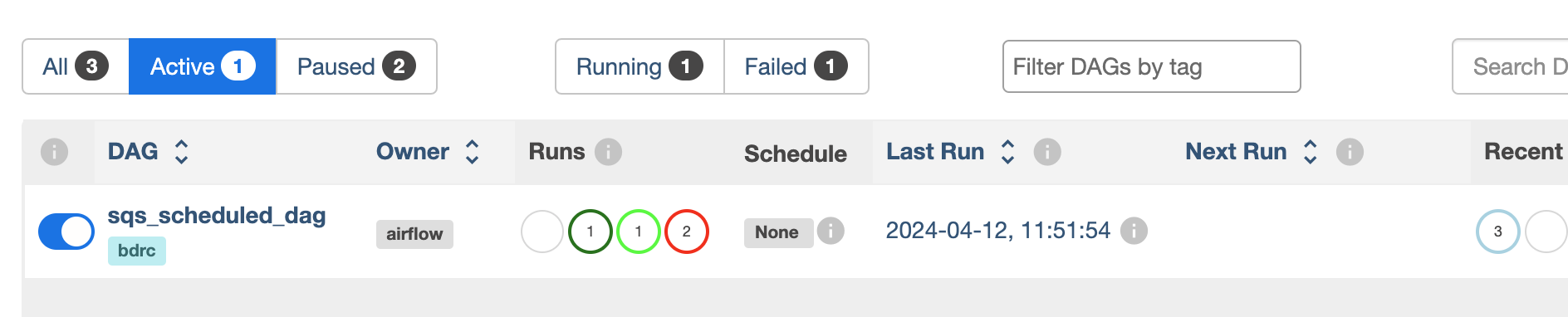
All this work supports essentially four functions, which comprise the process. The process container is an airflow DAG named sqs_scheduled_dag It appears in the docker UI (https://sattva:8089) as sqs_scheduled_dag.
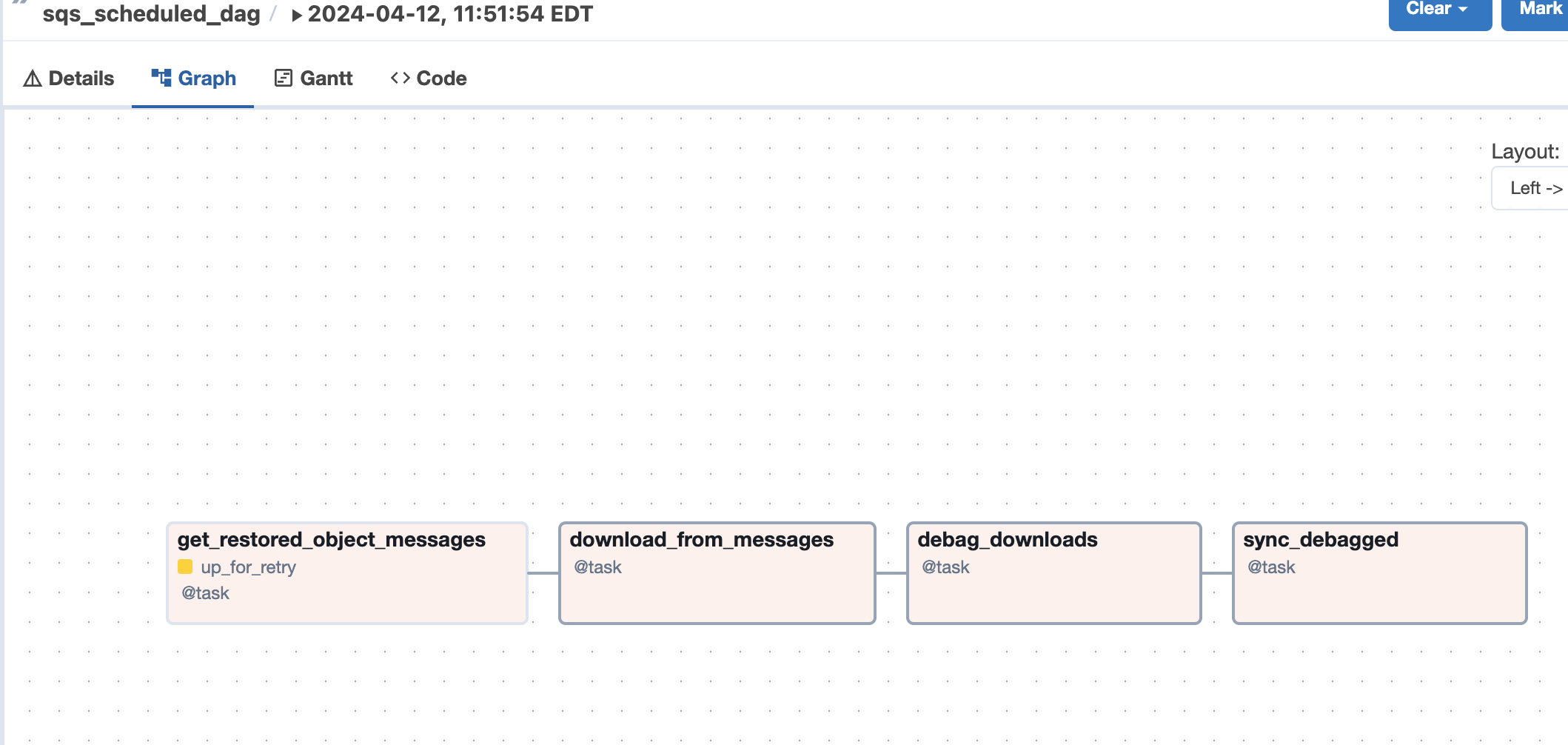
The DAG contains four tasks, which operate sequentially: their relationship is defined in the code quite directly, using an advanced airflow concept known as the Taskflow API.
msgs = get_restored_object_messages()
downloads = download_from_messages(msgs)
to_sync = debag_downloads(downloads)
sync_debagged(to_sync)
In the Airflow UI, their relationship is shown in the UI:
The actions of the scripts are mostly straightforward Python, but there are two airflow specific elements worth noting:
Retrying when there is no data
The get_restored_object_messages` task will retry if there are no messages. This is shown in the task graph above: the task is labeled as ‘up-for-retry’ This is given as a parameter to the task’s decorator. This is the only task to retry on failure, as it is the only one expected to fail, when there are no object messages to retrieve.
Using a bash shell
The task sync debagged uses a bash shell to run the syncOneWork.sh script. The environment to run that script is configured in the task itself. It is a separate environment from the docker image and the airflow container itself.